指南
源自真实 KMPlayer 反馈的故障排除
黑屏、音画漂移、字幕问题、侧栏广告与杀毒提示在公开评价中反复出现。这些步骤实用且针对产品。
画面黑屏或只有声音
Reviewers report updates where some files show no video while VLC still plays them. Often this is renderer or codec selection.
- 1. 先确认文件能在其他播放器打开,排除源文件被截断。
- 2. In KMPlayer preferences, switch the video renderer (or enable hardware acceleration if it is off, then try the reverse).
- 3. For HEVC / H.265 MKV files, verify Windows has a working HEVC decoder path and that KMPlayer is using its listed built-in HEVC support.
- 4. If the problem started after an update, roll back to a previous EXE from your own archive after checking its hash. See version history.
音画不同步
- 1. Use KMPlayer audio synchronization controls (listed on 64X feature pages) and nudge in small steps.
- 2. On multi-monitor PCs, try the 4.2 sound renderer select-by-monitors option so audio routes to the display you are watching.
- 3. Disable extra post-processing effects temporarily; heavy filters can add latency on older CPUs.
- 4. If only one container type drifts, re-mux or test an alternate audio track inside the MKV.
字幕无法加载或位置不对
- 1. Match the subtitle basename to the video, or open Subtitle and load SRT, ASS, SSA, SMI, SUB or IDX manually.
- 2. Adjust size, color and position from subtitle settings when text covers faces or sits off-screen.
- 3. For 3D material, use the 3D subtitle overlay controls described in desktop marketing copy.
- 4. If timing drifts, use delay controls rather than restarting the whole file.
最佳实践
- Keep external subtitles UTF-8 when possible to avoid mojibake in Korean, Japanese or Chinese tracks.
- Prefer ASS/SSA when you need styled karaoke or complex positioning.
- Bookmark long sessions with the built-in bookmark feature instead of remembering timestamps.
标准版右侧广告栏
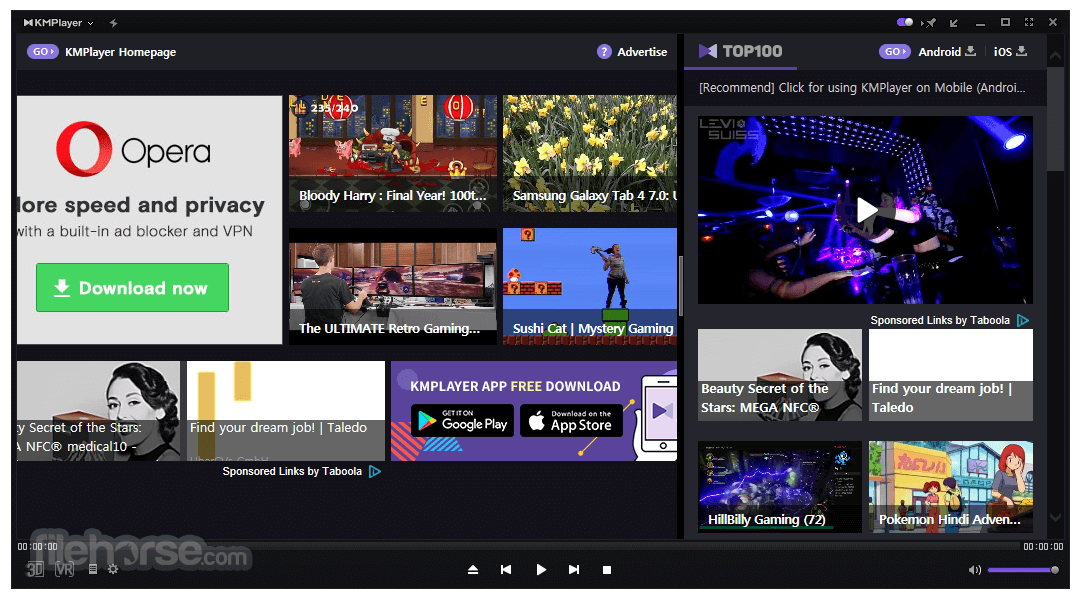
Multiple public reviews complain about a large promotional panel beside the video on free Windows builds. Official product pages themselves list advertisements on the classic PC line and market 64X as the no-ad option.
- 1. Look for the top-bar toggle reviewers mention for dismissing the side panel during a session.
- 2. Use fullscreen playback when you need the panel out of view temporarily.
- 3. If you need a publisher-marketed ad-free desktop player, install KMPlayer 64X on a supported 64-bit Windows system instead of the ad-supported classic line.
- 4. During setup, uncheck optional third-party offers so you do not install extra toolbars or companions.
针对 EXE 的杀毒警告
Packed installers and optional offer screens create noisy detections. Treat hash mismatch as a stop; treat a lone heuristic alert as a signal to verify, not a final verdict.
- 1. Re-download once and compare SHA-256 to the published value on the download integrity section.
- 2. Submit the exact EXE to your AV vendor portal if the hash matches and the alert persists.
- 3. Create a restore point before installing if your environment is sensitive.
- 4. After install, confirm file associations and remove any unexpected browser helpers added by offers you did not intend to accept.
KMPlayer